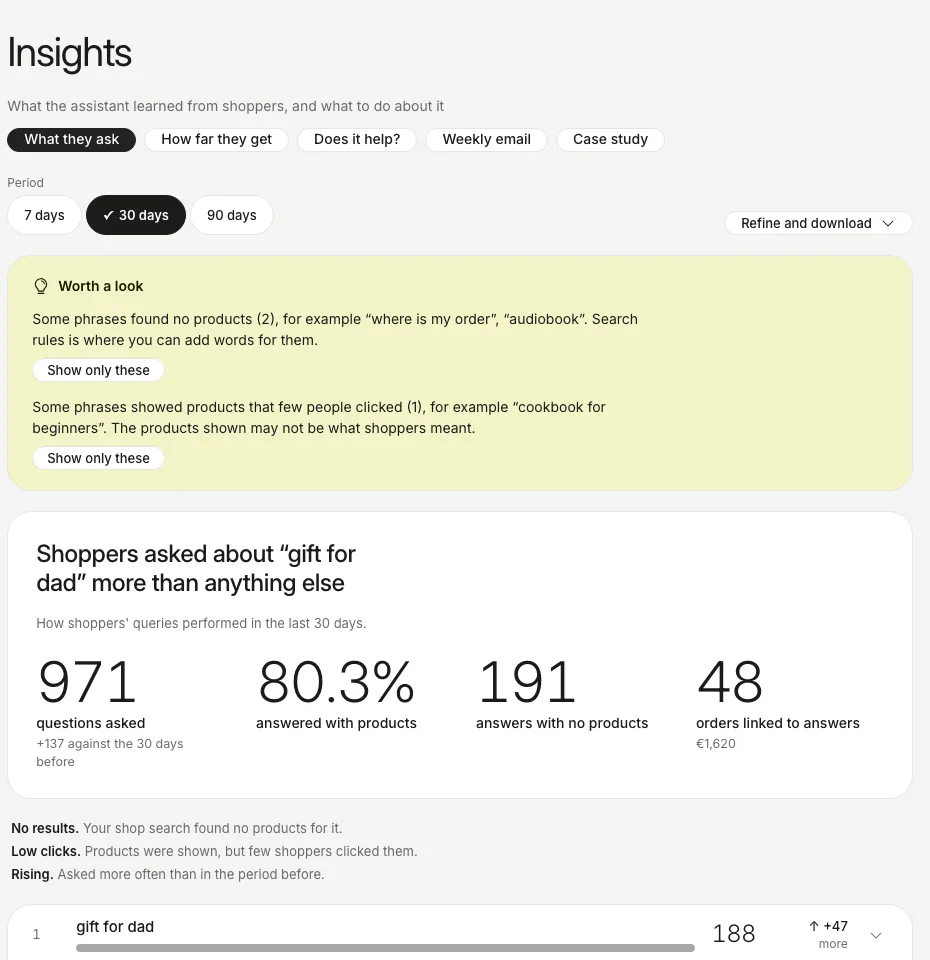
Insights answers three questions: what do shoppers ask, how far do they get, and does the assistant help.
Help centerThe screenshots show the real dashboard with sample data from a demo shop, not a live one.
Step
What it answers
How to read it
What they ask
The phrases shoppers type, most common first.
The “Worth a look” box flags phrases that found no products and phrases whose products few people clicked. “Show only these” filters the list.
How far they get
From the first question to a purchase.
Counted in sessions, not people. The biggest drop is marked “here you lose them”.
Does it help?
Visitors with and without the assistant, compared.
Only this comparison can show that the assistant caused a difference. The other figures show what we saw.
Weekly email
A short weekly summary sent to your inbox.
The page shows whether the email is switched on.
Case study
One page made from your own numbers.
Shared only if you agree.
The period buttons change every figure on the page at once. Each figure is compared with the period of the same length just before it.
The figures in the picture are sample data. Yours appear once real shoppers have asked the assistant something. The phrases that found nothing are explained in Read “Not found”.