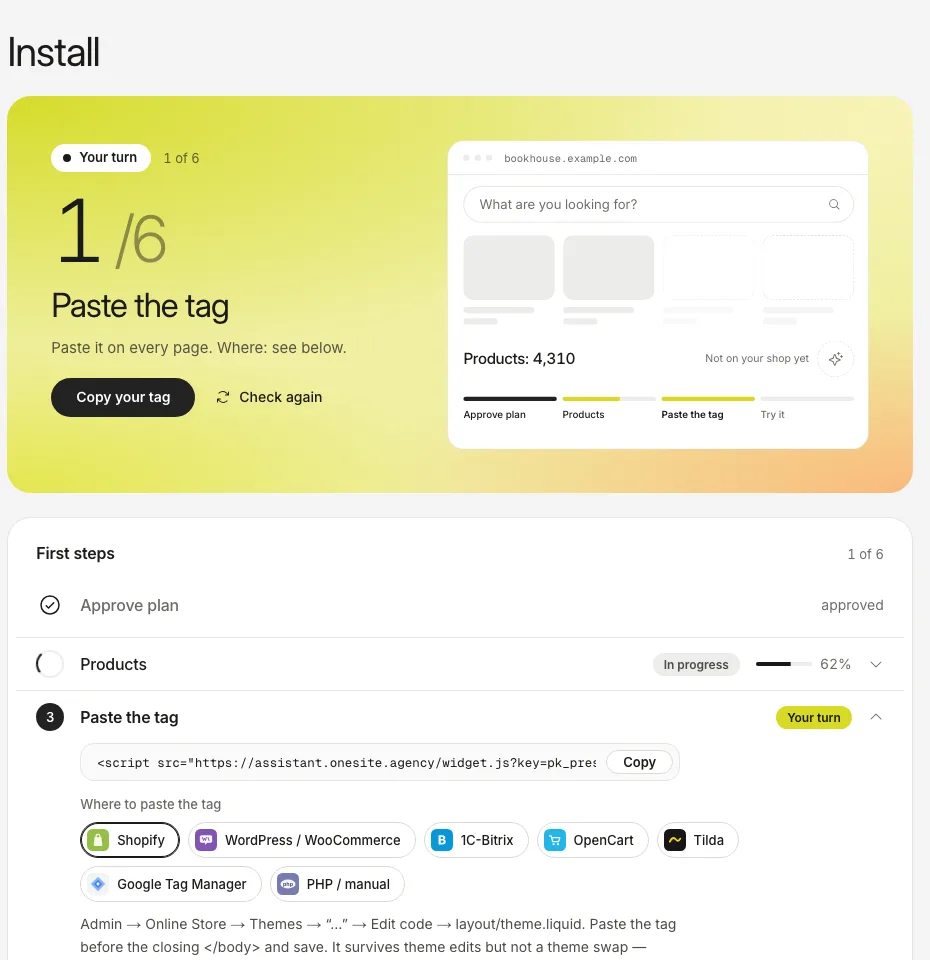
Open Install and copy your tag. It holds your shop key and looks like <script async src="…/widget.js?key=pk_…">.
Paste it into the template shared by all pages, just before the closing body tag. The table below says where, by platform.
Open your shop and press Check again in Install. It shows the address the tag was last loaded from.
If we cannot tell how to read your products, Install asks. Point us to the block that holds the product description, or give the address of a product feed.
The screenshots show the real dashboard with sample data from a demo shop, not a live one.
Platform
Where to paste the tag
1C-Bitrix
The template file footer.php of your template, before the closing body tag.
OpenCart
The file footer.twig in catalog/view/theme/<your theme>/template/common/, before the closing body tag.
Tilda
Site settings, More, HTML code for head and body, the field before the closing body tag. Publish the site again.
Google Tag Manager
Tags, New, Custom HTML, paste the line, trigger All Pages, Submit.
Your own PHP site
The shared footer template, before the closing body tag.
The key is meant to be public: it is visible in your page source. It only works on your own domain and on mirror domains you add in Install. A test copy of your site is not on that list, so add it there or the assistant will not load on it.
Through a tag manager the tag is not in the page HTML, so Check again cannot see it. It turns to live when the first visitor loads the page.