The assistant does not show on my shop
Install already knows most answers. Look at what it says first, then use the table.
Help center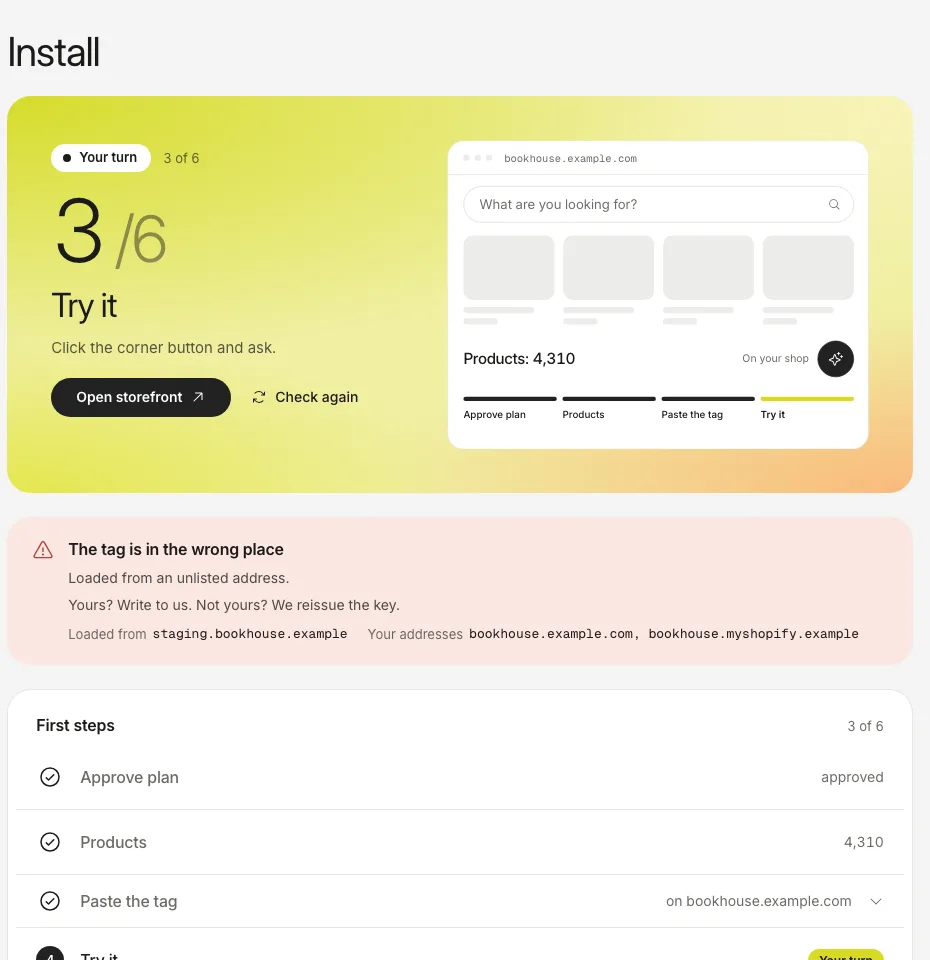
The screenshots show the real dashboard with sample data from a demo shop, not a live one.
| What you see | Most likely cause | What to do |
|---|---|---|
| The tag is in the wrong place, loaded from an unlisted address | The page that loaded the assistant is not an address of your shop, often a test copy or a theme preview. | If the address is yours, add it as a mirror domain in Install. If it is not yours, write to us and we reissue the key. |
| The tag was never loaded | Nobody has opened a page with the tag since you pasted it, or it is not on the page. | Open your shop in a private window, then press Check again. |
| The plan step is not done | The assistant stays off until the plan is approved. | Approve the plan in Plan. |
| Shopify: the embed is on but there is no button | The embed is on in a theme that is not published, or it was not saved. | Switch it on in the published theme and press Save. |
- Open your shop in a private window with extensions off: an ad blocker can hide the button.
- Look at Install and follow the row above that matches it.
- Behind a tag manager the page source will not show the tag. That is expected; judge by the status in Install.
How the tag is pasted: Install on any site with the tag.
Still stuck?
Write to hello@onesite.agency. Send your shop address and what the Install tab says: it usually shows the cause.